5 Aralık 2019 Perşembe

Oracle Database 12.2 New Feature => Re-order Table Online and Its Effect on Index Performance


With 12cR2, we can re-order our tables online according to any column.

Create and Fill table:
 

Order By empid:


Order By empname:


Performance Effect:

Reordering table can improve the performance of index access because if the table is ordered according to index column, we need to visit less leaf blocks and it will reduce the logical I/O.

Dummy Table:

Create a dummy table with 1.000.000 rows:

Create index on empid:

9 Ekim 2019 Çarşamba

RMAN => What is the difference between Full Backup & Level 0 Backup?


Hi,

While I was checking someone's RMAN backup strategy, I saw a very wrong configuration. They are taking Full Backup (Not Level 0) every sunday and taking Level 1 backup at the rest of the days.

I asked; why do you use Full Backup instead of Level 0?

They answered "Because if we use Level 0 backup, we see 'Incr Backup' at the Enterprise Manager Backup Reports Screen":)

They think that Level 0 and Full Backup are identical.

Let's test and see if they are really same or not:

--> Create RMAN backups with 2 different method while database is mounted:

Full Backup

RMAN> backup as compressed backupset database format '/u01/app/oracle/backup/full_backup_%U.bck';

Level 0 Backup

backup as compressed backupset incremental level 0 database format '/u01/app/oracle/backup/level0_%U.bck';

Check the size of backups:


As you see, the size of the backups are identical.

-->I will delete all backups and take a "Full Backup" one more time:

RMAN> delete noprompt force backup;

RMAN> backup as compressed backupset database format '/u01/app/oracle/backup/full_backup_%U.bck';


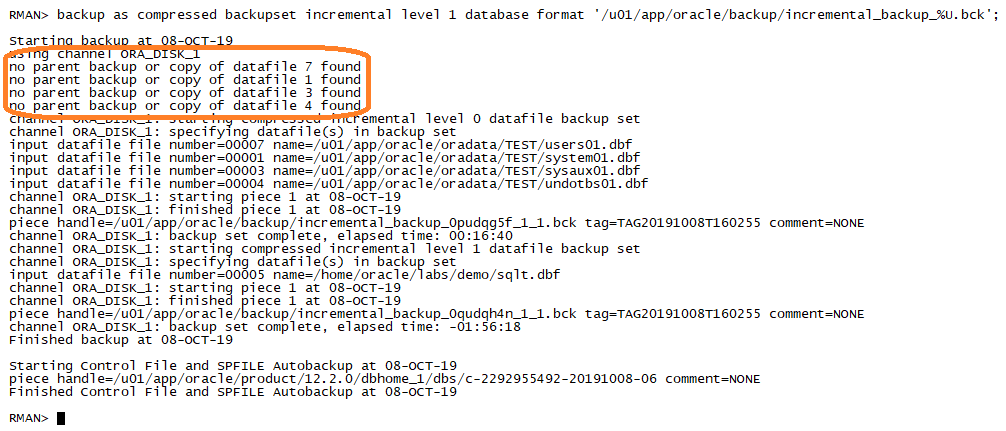
--> I will take a "Incremental Backup" and check the logs:


The RMAN log says "there is no parent backup or copy of datafile". So it means that the "Full Backup" which is previously taken before incremental backup is useless for "Incremental Backup Strategy"

Also, check the size of the incremental backup;


Total size of incremental backups and full backup are almost same. Therefore, we can understand that our Level 1 incremental backup is actually a Level 0 full backup.

Conclusion

Do not use "Full Backups" for your Incremental Backup strategy. Your incremental backups can be used only if you have Level 0 parent backups.


4 Ekim 2019 Cuma

How to Identify Hot Objects for "dbms_shared_pool.markhot" after Oracle Database 12cR2?


Hi,

With 12cR2, there are some modifications for X$KGLOB table.

The columns KGLOBT23 was replaced with "KGLOBLCT" and  KGLOBT24 was replaced with "KGLOBPCT".

So, you can use the following query to identify hot objects then you can mark them with dbms_shared_pool package.

select *
  from (Select case
                 when (kglhdadr = kglhdpar) then
                  'Parent'
                 else
                  'Child ' || kglobt09
               end cursor,
               kglhdadr ADDRESS,
               substr(kglnaobj, 1, 20) name,
               kglnahsh hash_value,
               kglobtyd type,
               KGLOBLCT LOCKED_TOTAL,
               KGLOBPCT PINNED_TOTAL,
               kglhdexc EXECUTIONS,
               kglhdnsp NAMESPACE
          from x$kglob
         order by KGLOBPCT desc)
 where rownum <= 20


10 Temmuz 2019 Çarşamba

Oracle Database 12c => Read Privilege

Do you think "SELECT" privilege is very innocent?

Maybe we should consider that one more time:

Creating a user and give priviliges which can select "hr.employees" table.
SQL> create user myuser identified by ora123;

User created.

SQL> grant connect, resource to myuser;

Grant succeeded.

SQL> grant select on hr.employees to myuser;

Grant succeeded.
Connect with new user and select employees table with "FOR UPDATE" option:
SQL> conn myuser
Enter password: 
Connected.

SQL> show user
USER is "MYUSER"

SQL> select * from hr.employees for update;
.
.
.
107 rows selected.

SQL> 
As you see I could lock whole table only with "SELECT" privilege.
It means if you give "SELECT" privilege for a table to a specific user, that user is able to lock against DML transactions from other sessions.

So, it means you should be very careful while giving "SELECT" privilege or you can user "READ" privilege with 12c.

Let's try "READ" privilege
SQL> create user myuser2 identified by ora123;   

User created.

SQL> grant connect, resource to myuser2;

Grant succeeded.

SQL> grant read on hr.employees to myuser2;

Grant succeeded.
Now, try to lock the table with "READ" privilege
SQL> conn myuser2;
Enter password: 

SQL> show user;
USER is "MYUSER2"

SQL> select * from hr.employees for update;

select * from hr.employees for update
                 *
ERROR at line 1:
ORA-01031: insufficient privileges

If you are using Oracle Database 12c, it is much more better to give "READ" privilege to your users if they only need to see table's data.


8 Temmuz 2019 Pazartesi

Oracle Database 12c => Online Statistics Gathering

With 12c and later, Oracle has introduced online statistics gathering for bulk operations like CTAS and and INSERT operation (with APPEND).

There is a new hidden parameter which controls this behaviour:

"_optimizer_gather_stats_on_load" 

By default, this parameter is true.

Effect On Direct Load Operations

When you create a table with CTAS, its statistics will be collected automatically.
SQL> explain plan for
  2  create table my_emp as select * from hr.employees;

Explained.

SQL> SELECT * FROM table (DBMS_XPLAN.DISPLAY('plan_table', null, 'basic'));

PLAN_TABLE_OUTPUT
--------------------------------------------------------------------------------
Plan hash value: 3521905591

------------------------------------------------------
| Id  | Operation                        | Name      |
------------------------------------------------------
|   0 | CREATE TABLE STATEMENT           |           |
|   1 |  LOAD AS SELECT                  | MY_EMP    |
|   2 |   OPTIMIZER STATISTICS GATHERING |           |
|   3 |    TABLE ACCESS FULL             | EMPLOYEES |
------------------------------------------------------

10 rows selected.
As you see in the explain plan, there is an extra step for statistics.

Lets create the table and check weather the table stats exist:
18:04:25 SQL> create table my_emp as select * from hr.employees;

Table created.

18:04:38 SQL> 
18:04:42 SQL> column table_name format a30
18:05:02 SQL> column last_analyzed format a30
18:05:10 SQL>
18:06:23 SQL> select table_name, last_analyzed
18:06:38   2  from user_tables
18:06:43   3  where table_name='MY_EMP';

TABLE_NAME                     LAST_ANALYZED
------------------------------ ------------------------------
MY_EMP                         27.06.2019 18:04:38

The "last_analyzed" time is exactly same with the creation time of the table.


Now, disable the online stats gathering on session level and create another table;
18:55:23 SQL> ALTER SESSION SET "_OPTIMIZER_GATHER_STATS_ON_LOAD"=FALSE;

Session altered.

18:55:54 SQL> 
18:55:57 SQL> create table my_emp2 as select * from employees;

Table created.

18:56:13 SQL> column table_name format a30
18:56:26 SQL> column last_analyzed format a30
18:56:31 SQL> 
18:56:32 SQL> select table_name, last_analyzed
18:56:39   2  from user_tables
18:56:44   3  where table_name='MY_EMP2';

TABLE_NAME                     LAST_ANALYZED
------------------------------ ------------------------------
MY_EMP2
There is no statistics for MY_EMP2 table.

It is also possible online stats gathering can impact your bulk load performance;

I have a filled table "TEST_DATA" which has 500.000 rows and empty tables TEST_DATA1 and TEST_DATA2 with same structure.

Online Statistics Gathering is Off;
SQL> alter system flush buffer_cache;

SQL> ALTER SESSION SET "_OPTIMIZER_GATHER_STATS_ON_LOAD"=FALSE;

Session altered.

Elapsed: 00:00:00.00
SQL> 
SQL> insert /*+ APPEND*/ into test_data1 select * from test_data;

5000000 rows created.

Elapsed: 00:00:08.72

SQL> select * from table(dbms_xplan.display_cursor);

SQL_ID  d10rkrsh5kqgg, child number 0
-------------------------------------
insert /*+ APPEND*/ into test_data1 select * from test_data

Plan hash value: 3839850929

---------------------------------------------------------------------------------
| Id  | Operation          | Name       | Rows  | Bytes | Cost (%CPU)| Time     |
---------------------------------------------------------------------------------
|   0 | INSERT STATEMENT   |            |       |       |  5256 (100)|          |
|   1 |  LOAD AS SELECT    | TEST_DATA1 |       |       |            |          |
|   2 |   TABLE ACCESS FULL| TEST_DATA  |  5679K|   157M|  5256   (1)| 00:00:01 |
---------------------------------------------------------------------------------

Note
-----
   - dynamic statistics used: dynamic sampling (level=2)

Online Statistics Gathering is On;
SQL> alter system flush buffer_cache;

SQL> ALTER SESSION SET "_OPTIMIZER_GATHER_STATS_ON_LOAD"=TRUE;

Session altered.

SQL> insert /*+ APPEND*/ into test_data2 select * from test_data;

5000000 rows created.

Elapsed: 00:00:13.27

SQL> select * from table(dbms_xplan.display_cursor);

SQL_ID  1n4c3095axqa0, child number 0
-------------------------------------
insert /*+ APPEND*/ into test_data2 select * from test_data

Plan hash value: 3839850929

-----------------------------------------------------------------------------------------------
| Id  | Operation                        | Name       | Rows  | Bytes | Cost (%CPU)| Time     |
-----------------------------------------------------------------------------------------------
|   0 | INSERT STATEMENT                 |            |       |       |  5256 (100)|          |
|   1 |  LOAD AS SELECT                  | TEST_DATA2 |       |       |            |          |
|   2 |   OPTIMIZER STATISTICS GATHERING |            |  5679K|   157M|  5256   (1)| 00:00:01 |
|   3 |    TABLE ACCESS FULL             | TEST_DATA  |  5679K|   157M|  5256   (1)| 00:00:01 |
-----------------------------------------------------------------------------------------------

Note
-----
   - dynamic statistics used: dynamic sampling (level=2)
It spent almost 5 seconds to gather statistics after insert operation.

So, we can say that if we have huge insert operation and if we want to speed it up, it would be good to disable online statistics and gather manually (maybe parallel) after insert finihed.




25 Haziran 2019 Salı

Oracle Database 19c New Feature => Propagate Restore Points from Primary to Standby site


With Oracle Database 19c, restore points which are created on primary database are automatically replicated on standby.

The restore points on standby are always normal restore points. It doesn't matter it is guaranteed or normal restore points on primary database.

There are 3 prerequisites for this feature:

1. The compatible parameter both on primary and standby database must be 19.0.0 or greater

2. The primary database must be open (not mounted) because of restored point replication is occured  through the redo logs. So, MRP process on standby needs to be running for replication.

3. There shouldn't be any existing restore point on standby database with same name.

Create a restore point on our 19c Primary database and see what is happening;


We created our restore point on primary. As you see there is a new column "REPLICATED" on "V$RESTORE_POINT" view and its value is "NO" on primary.


Let's check standby;


The name of the restore point on standby has suffix "PRIMARY" and "REPLICATED" column becomes "YES"


23 Mayıs 2019 Perşembe

"O7_DICTIONARY_ACCESSIBILITY" Security Parameter

The "O7_DICTIONARY_ACCESSIBILITY" setting is a database initializations parameter that allows/disallows with the EXECUTE ANY PROCEDURE and SELECT ANY TABLE access to objects in the SYS schema; this functionality was created for the ease of migration from Oracle 7 databases to later versions.

As leaving the SYS schema so open to connection could permit unauthorized access to critical data structures, this value should be set according to the needs of the organization.

Eventually, if this parameter is set to TRUE without your knowledge, your database may be at risk.

From Oracle Docs:

For example, if "O7_DICTIONARY_ACCESSIBILITY" is set to false, then the SELECT ANY TABLE privilege allows access to views or tables in any schema except the SYS schema (data dictionary tables cannot be accessed). The system privilege EXECUTE ANY PROCEDURE allows access on the procedures in any schema except the SYS schema.

If this parameter is set to false and you need to access objects in the SYS schema, then you must be granted explicit object privileges. The following roles, which can be granted to the database administrator, also allow access to dictionary objects:


  • SELECT_CATALOG_ROLE
  • EXECUTE_CATALOG_ROLE
  • DELETE_CATALOG_ROLE